Reports
LiMon Intelligence reports turn monitored license data into live web views, PDF artifacts, and scheduled report runs. They are meant for estate review, application ownership, site comparisons, savings analysis, audit preparation, and finance-oriented allocation workflows.
Reports use the same DB-backed model configured in the Admin UI: servers, applications, feature mappings, sites, AD/LDAP enrichment, privacy settings, and cost data. When those inputs are incomplete, reports still run, but sections that depend on business context may show gaps or unallocated rows.
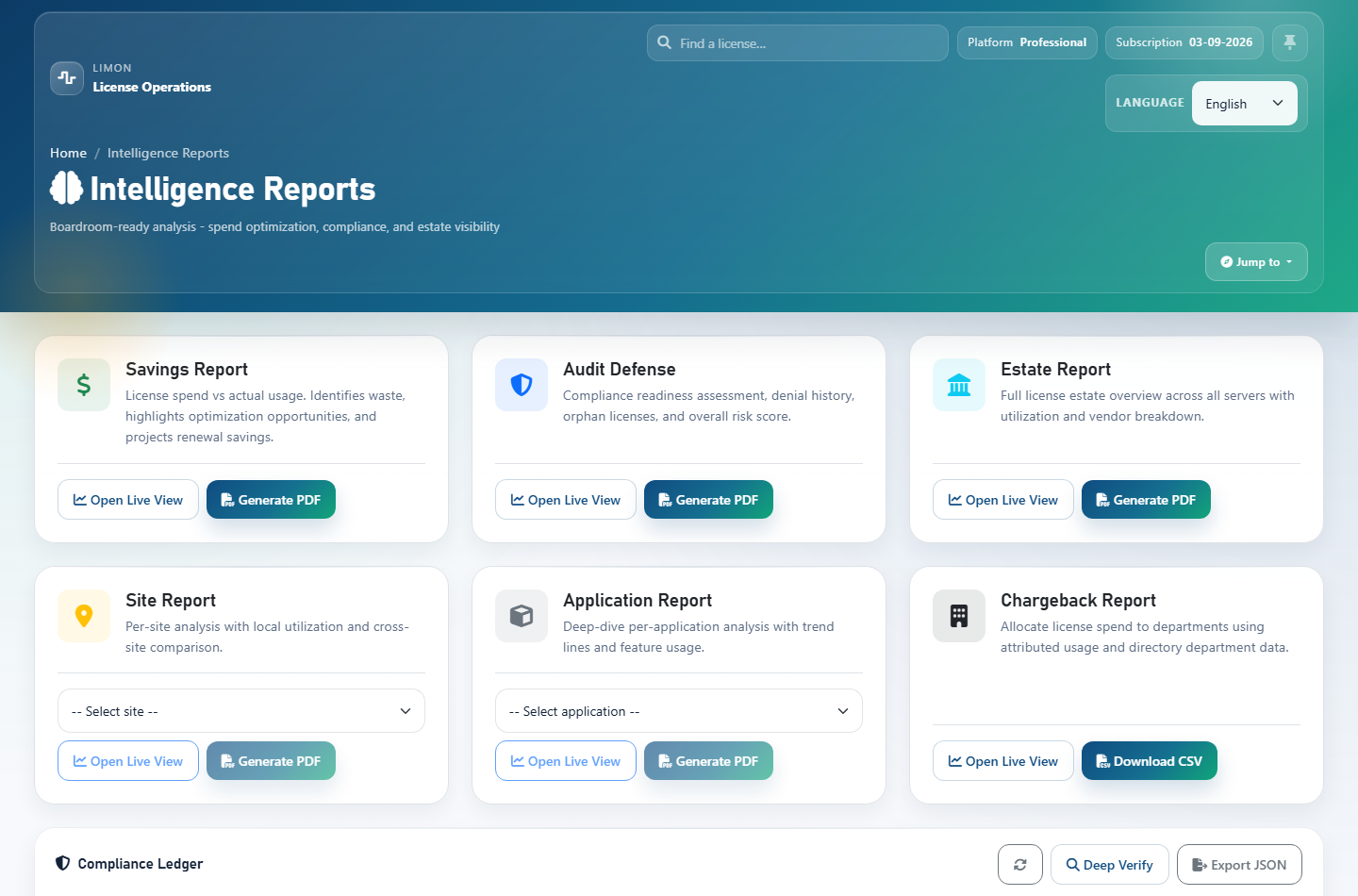
Report Types
| Report | Web view | Useful for | |
|---|---|---|---|
| Estate Sub | Yes | Yes | Estate-wide application usage across all applications defined in LiMon. |
| Application Sub | Yes | Yes | A selected application, including related features, users, utilization, and demand. |
| Site Sub | Yes | Yes | A selected site/location, with rollups based on site assignments. |
Savings (money) Sub |
Yes | Yes | Underused capacity, unused features, renewal exposure, vendor summary, and cost-savings opportunities. Requires useful application/feature cost data for best results. |
| Audit Defense Sub | Yes | Yes | Compliance posture over a selected period, including capacity, denials, overdraft signals, expiring licenses, and audit-risk indicators. |
| Chargeback Pro Sub | Yes | CSV | Department allocation and finance export. Requires advanced analytics, cost data, and department context from AD/LDAP or maintained mappings. |
PDF-capable report types are estate, app, site, money, and audit. Chargeback is intentionally a live view plus JSON/CSV export rather than part of the shared PDF artifact path.
Live Web Views
Live report views are the interactive version of each report. They are lighter than PDF generation and are the best place to inspect current report data before producing or regenerating a PDF.
The examples below show partial contents of the Audit Defense live view: the top-level compliance posture, denial pressure, application compliance portfolio, and priority actions that help prepare evidence for audit conversations.
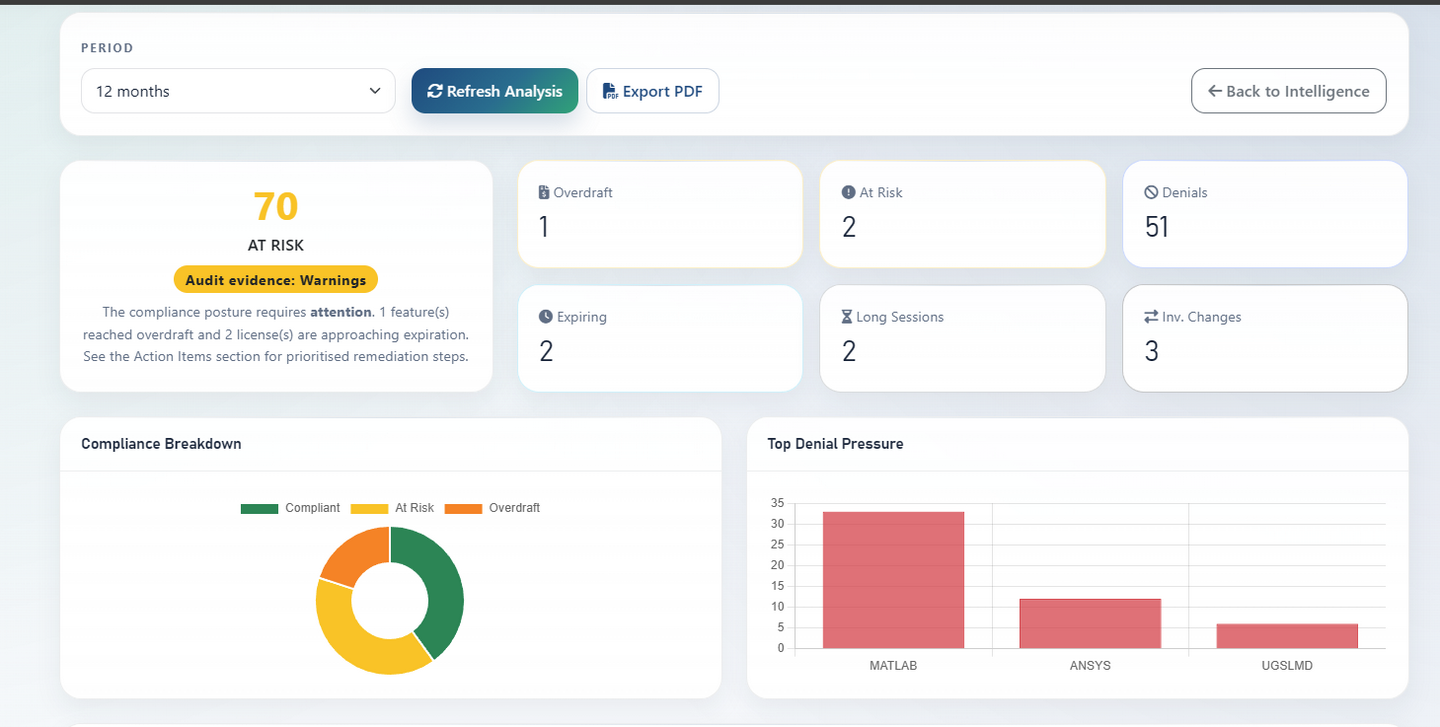
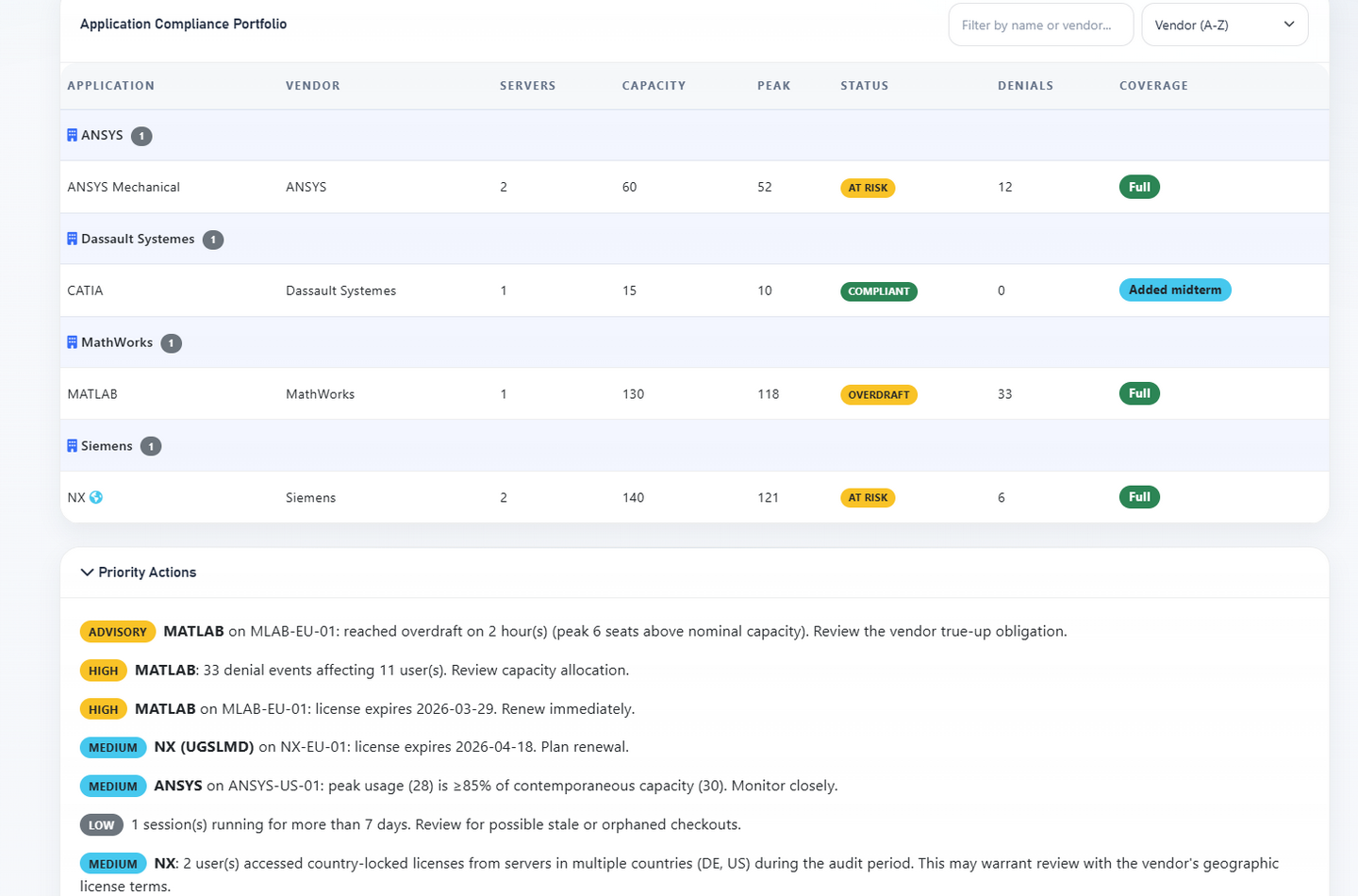
Open a live report from the Intelligence overview, choose the report family, and select the relevant application, site, period, or privacy option when the report needs one. The live page is also where users can check whether an existing PDF is available before generating another artifact.
PDF Generation
PDF generation is asynchronous. When a user clicks Generate PDF or Regenerate, LiMon queues a durable job and a report worker renders the PDF outside the web request. Repeated requests for the same exact report attach to the same live job, and the newest successful exact-match artifact is surfaced by default.
If an exact matching PDF already exists, the report page can offer Download existing instead of forcing a new generation. Use Regenerate when the underlying data or settings have changed and a fresh artifact is needed.
Scheduling
Schedules use the same durable queue as manual PDF generation. The scheduler checks due schedules periodically, queues the matching report, and can send email when SMTP and recipients are configured.
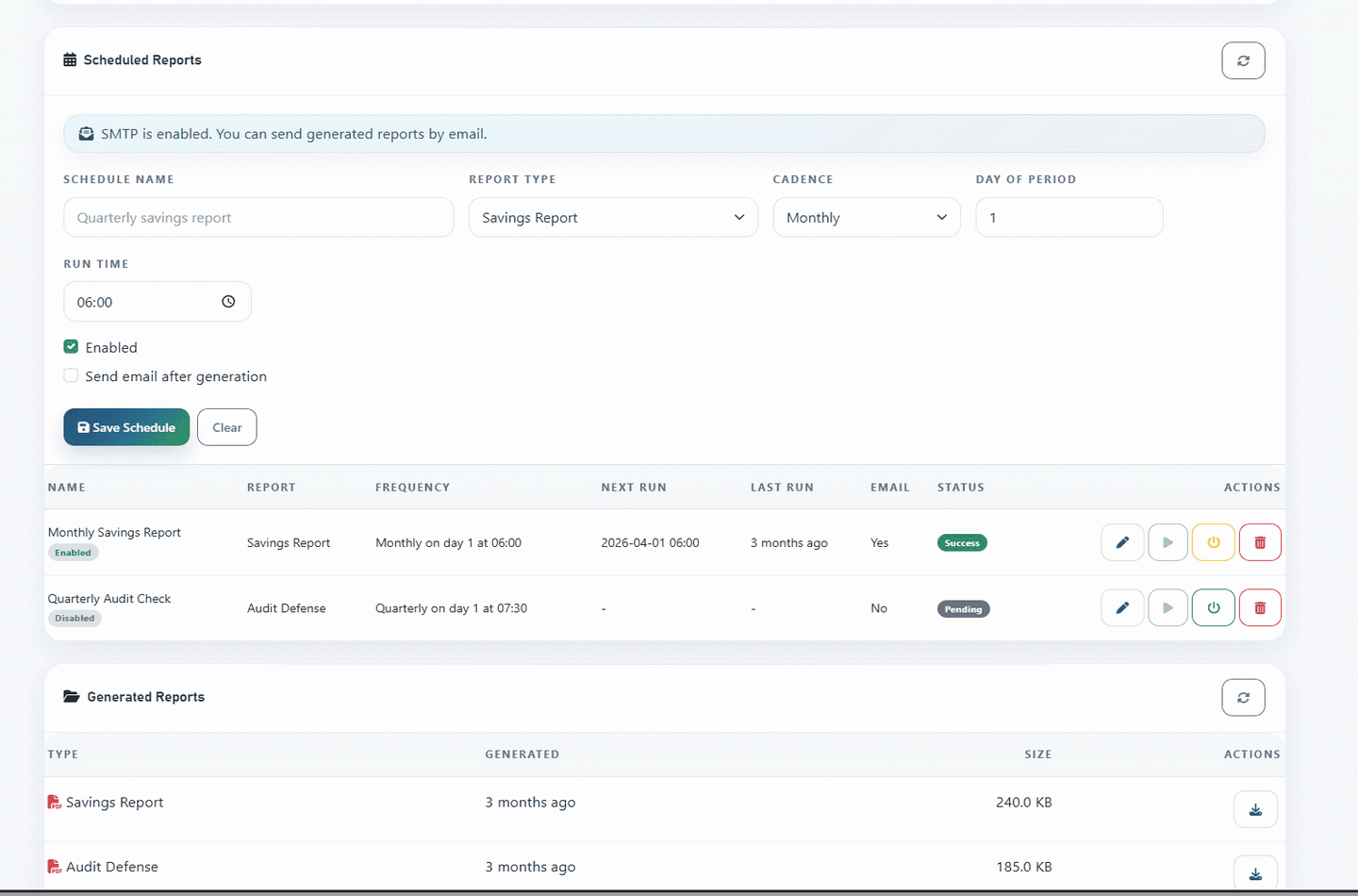
Use schedules for recurring review packs such as monthly estate reviews, quarterly audit preparation, or yearly savings analysis. Valid cadences are monthly, quarterly, and yearly. Scheduled email delivery depends on SMTP being configured and on recipients being set for the schedule.
Settings And Storage
Report settings are managed from the Admin UI/API, with defaults.yml providing shipped defaults. The most visible operational settings are:
| Setting | Default | Notes |
|---|---|---|
reports.output.directory |
/opt/limon/reports/intelligence |
Source of truth for generated PDF artifacts. Use an absolute path. |
reports.retention_days |
90 |
Old PDF files and superseded artifact rows are cleaned up after the retention window. |
reports.money.default_period_months |
12 |
Default Savings analysis window. |
reports.money.currency |
EUR |
Single configured currency used by money-oriented report output. |
reports.audit.default_period_months |
12 |
Default Audit Defense analysis window. |
privacy.mask_usernames_default |
false |
Default privacy mode for reports and related API payloads. |
API For Automation
Most users generate and schedule reports from the frontend. Use the API when you need automation, scripting, integration with another portal, or external report retrieval.
All protected report calls require the API key header:
Live-view endpoints:
| Endpoint | Notes |
|---|---|
GET /api/v1/reports/view/estate |
Optional mask_usernames=true. |
GET /api/v1/reports/view/app?app_name=<name> |
app_name is required. Optional mask_usernames=true. |
GET /api/v1/reports/view/site?site_name=<name> |
site_name is required. Optional mask_usernames=true. |
GET /api/v1/reports/view/money?period_months=12&safety_margin=0.10 |
period_months and safety_margin are optional; configured defaults apply when omitted. |
GET /api/v1/reports/view/audit?period_months=12 |
period_months is optional; configured defaults apply when omitted. |
GET /api/v1/reports/view/chargeback?period=quarter |
Also accepts period_months=1, 3, 6, or 12. |
GET /api/v1/reports/chargeback?format=csv&period=quarter |
Finance-oriented CSV export. Use format=json for API consumers. |
Generate a PDF:
curl -X POST "http://your-limon-host/api/v1/reports/generate" \
  -H "X-API-KEY: <api-key>" \
  -H "Content-Type: application/json" \
  -d '{
    "type": "money",
    "params": {
      "period_months": 12,
      "safety_margin": 0.10
    }
  }'
Poll the queued job:
Resolve an existing exact-match artifact before generating another one:
curl "http://your-limon-host/api/v1/reports/artifact?type=money&period_months=12&safety_margin=0.10" \
  -H "X-API-KEY: <api-key>"
Download the returned PDF artifact:
curl -o report.pdf "http://your-limon-host/api/v1/reports/download/<filename>" \
  -H "X-API-KEY: <api-key>"
Useful params values:
| Report type | Params |
|---|---|
estate |
{} for PDF generation. Live views also accept mask_usernames=true as a query parameter. |
app |
{"app_name": "MATLAB"}. Live views also accept mask_usernames=true as a query parameter. |
site |
{"site_name": "US-NYC"}. Live views also accept mask_usernames=true as a query parameter. |
money |
Optional period_months, safety_margin. |
audit |
Optional period_months. |
Create a monthly Estate PDF schedule:
curl -X POST "http://your-limon-host/api/v1/reports/schedules" \
  -H "X-API-KEY: <api-key>" \
  -H "Content-Type: application/json" \
  -d '{
    "name": "Monthly Estate Review",
    "report_type": "estate",
    "report_params": {},
    "cadence": "monthly",
    "run_time": "06:30",
    "day_of_month": 1,
    "enabled": true,
    "email_enabled": true,
    "email_recipients": "[email protected]"
  }'
Schedule endpoints:
| Method | Endpoint | Purpose |
|---|---|---|
GET |
/api/v1/reports/schedules |
List schedules and SMTP readiness. |
POST |
/api/v1/reports/schedules |
Create a schedule. |
PUT |
/api/v1/reports/schedules/<id> |
Update a schedule. |
DELETE |
/api/v1/reports/schedules/<id> |
Delete a schedule. |
POST |
/api/v1/reports/schedules/<id>/run-now |
Queue the schedule immediately. |
For a broader endpoint inventory, see the API Reference.